Ever wondered how network forensics experts decrypt encrypted data? Let’s dive into the world of secure communications and uncover the techniques used to reveal hidden payloads.
The Rise of Encrypted Communication
As security techniques have evolved, so have the tactics of adversaries. Most internet communication today uses HTTPS, where the “S” stands for “Secure.” HTTPS, the successor to the plain-text HTTP protocol, employs SSL/TLS to encrypt data, ensuring privacy and security. However, modern adversaries exploit this encryption to deliver malicious code or data to target systems in an encrypted form, making it challenging to trace or reverse-engineer their payloads.
Techniques to Decrypt SSL/TLS Communication
Network forensics experts use several methods to decrypt SSL/TLS traffic. Here are the three primary approaches:
- SSL/TLS Offloaders
Organizations deploy specialized hardware for deep packet inspection to perform SSL offloading and inspect encrypted traffic. This method, while effective, is costly due to the need for dedicated hardware, limiting its widespread use. - Intercepting Proxies
This cost-effective method involves installing certificates on monitored devices. The proxy establishes a connection with the SSL/TLS-enabled endpoint on behalf of users, providing a clear-text view of the requests. It’s widely used due to its affordability. - Dumping SSL/TLS Premaster Secrets
This method uses client-side premaster secret keys to decrypt traffic, particularly for capturing data from applications like browsers. It’s the most cost-effective and straightforward approach for decrypting traffic between a system and an attacker’s server.
Among these, dumping SSL/TLS premaster secrets stands out for its simplicity and affordability. It leverages the SSLKEYLOGFILE environment variable to store master SSL/TLS keys, which are compatible with most browsers and tools like Wireshark.
Step-by-Step Guide to Decrypting SSL/TLS Traffic Using Premaster Secrets
Let’s explore the process of decrypting SSL/TLS traffic using the premaster secrets method in detail.
Prerequisites
A packet capture tool like Wireshark installed on your system.
Steps
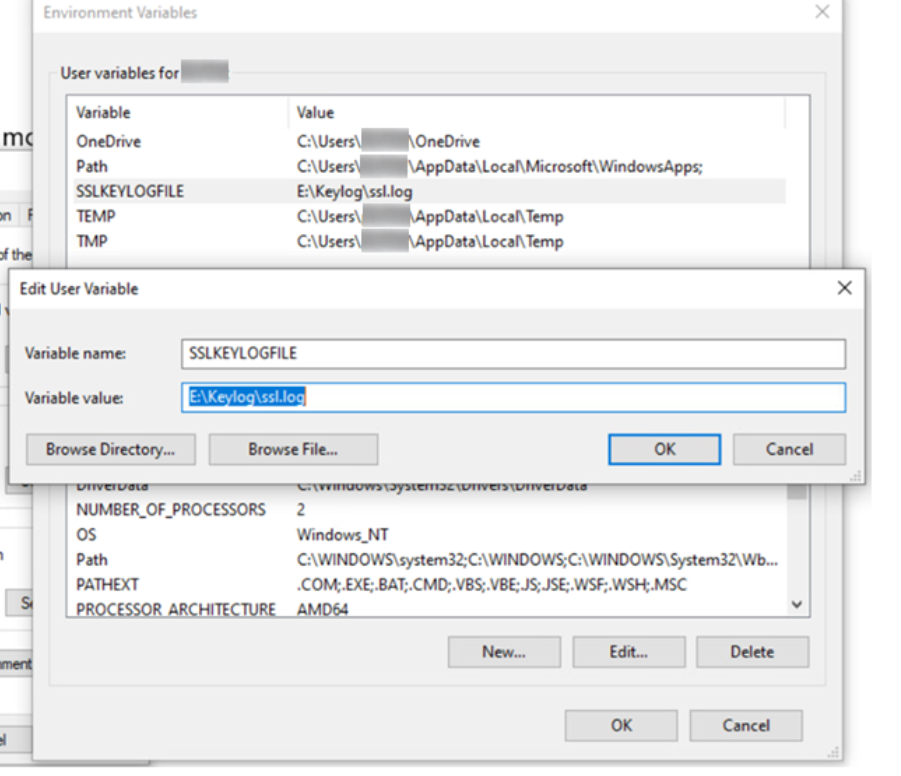
- Set Up the SSLKEYLOGFILE Environment Variable (Windows)
- Open Command Prompt (CMD) with administrative privileges and run
sysdm.cpl. - Navigate to Advanced > Environment Variables.
- Under User Variables, click New.
- Set the variable name as
SSLKEYLOGFILEand the value as the file path where the keys will be saved (e.g.,E:\Keylog\ssl.log).
- Open Command Prompt (CMD) with administrative privileges and run
- Capture Network Traffic
- Open Wireshark and select the network interface you’re using (e.g., Wi-Fi, Ethernet).
- Start capturing packets.
- Generate TLS Traffic
- Open a browser (e.g., Google Chrome) and visit a website that uses TLS encryption, such as
wireshark.org.
- Open a browser (e.g., Google Chrome) and visit a website that uses TLS encryption, such as
- Stop Packet Capture
- In Wireshark, stop the packet capture.
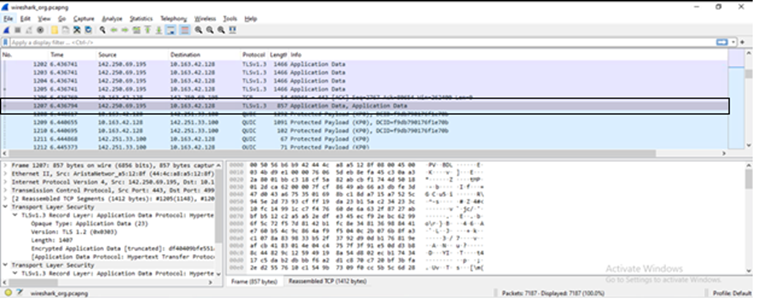
- Identify Encrypted TLS Packets
- Filter for packets with the protocol
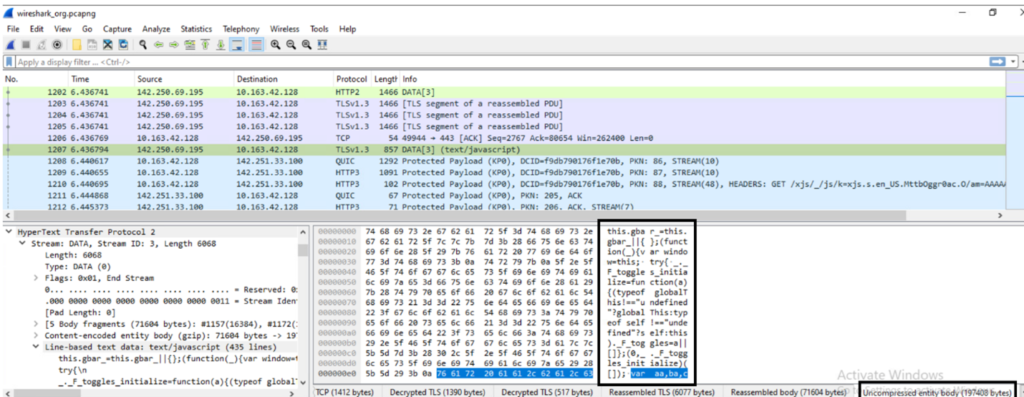
TLSv1.3and look for those labeled asApplication Data. For example, in a sample packet capture, packet number 1207 might show encrypted data.
- Filter for packets with the protocol
- Configure Wireshark to Use Premaster Secret Keys
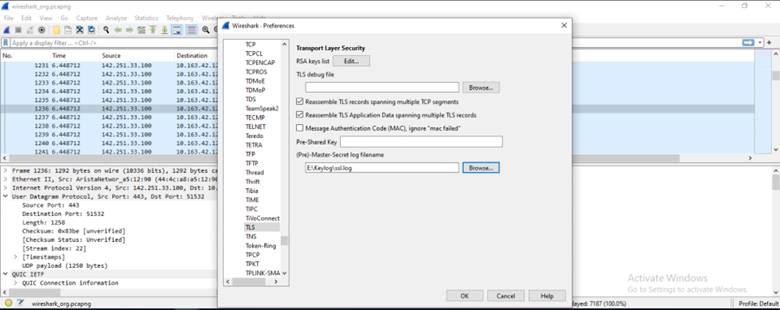
- Go to Edit > Preferences > Protocols > TLS.
- In the
(Pre)-Master-Secret log filenamefield, select thessl.logfile created earlier (e.g.,E:\Keylog\ssl.log).
- View Decrypted Data
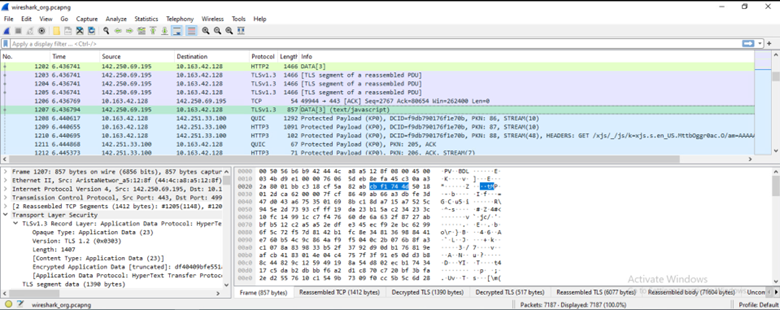
- After applying the premaster secret key, revisit the packet (e.g., packet 1207). The packet info should now display
text/javascript,text/html, or similar, indicating successful decryption. - Select the Uncompressed Entity Body tab in the packet details to view the decrypted content, such as plain-text JavaScript code.
- After applying the premaster secret key, revisit the packet (e.g., packet 1207). The packet info should now display
Leave a Reply